Sharing useful documents online is a simple way to reach a wider audience. Whether you have a PowerPoint presentation, PDF guide, business report, educational material, case study, or eBook, document-sharing websites can help you showcase your content to more people.
For students, marketers, businesses, freelancers, and content creators, these platforms can also support content promotion, brand visibility, referral traffic, and online presence.
What Are PPT & PDF Sharing Websites?
PPT and PDF sharing websites are online platforms where users can upload and publish documents for others to view, read, or download.
You can share different types of content, including:
- PowerPoint presentations
- PDF documents
- Business reports
- eBooks
- Case studies
- Tutorials and guides
- Educational presentations
- Marketing presentations
- Research documents
Instead of keeping your documents only on your computer or website, document-sharing platforms allow you to put your content in front of a larger online audience.
Why Should You Use PPT & PDF Sharing Websites?
Document-sharing platforms can be useful as part of a broader content marketing and SEO strategy.
1. Increase Content Visibility
Publishing your presentations and PDFs on popular platforms can help your content reach people who are already searching for similar information.
2. Promote Your Website
You can include relevant website information, company details, or links within your documents where the platform allows it. This can help interested readers discover your website.
3. Build Brand Awareness
Businesses can use presentations, brochures, reports, and educational PDFs to introduce their products, services, expertise, and brand.
4. Reach a New Audience
People who use document-sharing websites may discover your content even if they have never visited your website before.
5. Support Content Marketing
A single blog post can be converted into a presentation or PDF guide and distributed through multiple platforms. This allows you to reuse existing content in a useful format.
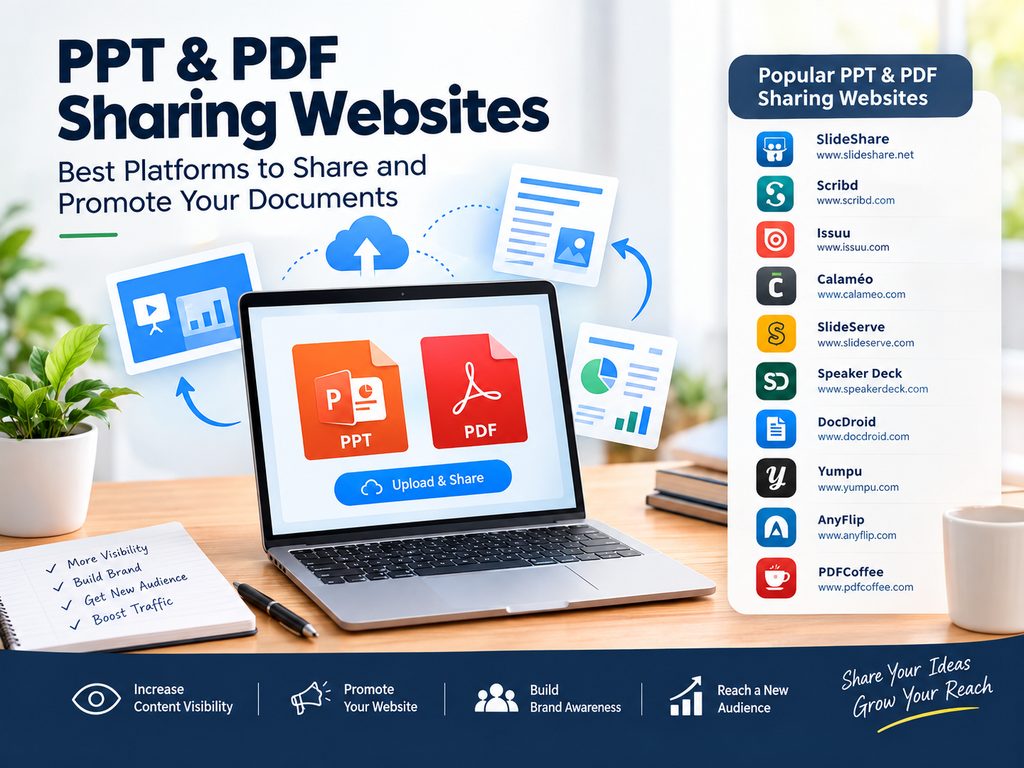
Best PPT & PDF Sharing Websites
Below are some well-known platforms that can be considered for sharing presentations and documents:
| S.NO | Website Name | Website Link | Best For |
| 1 | SlideShare | https://www.slideshare.net/ | PPT, PPTX and PDF presentations |
| 2 | Scribd | https://www.scribd.com/ | Documents, presentations and ebooks |
| 3 | Issuu | https://issuu.com/ | Digital publications and magazines |
| 4 | Calaméo | https://www.calameo.com/ | Interactive documents and publications |
| 5 | SlideServe | https://www.slideserve.com/ | PowerPoint presentations |
| 6 | Speaker Deck | https://speakerdeck.com/ | Professional presentations |
| 7 | DocDroid | https://www.docdroid.com/ | PDF and document sharing |
| 8 | Yumpu | https://www.yumpu.com/ | Digital magazines and publications |
| 9 | AnyFlip | https://anyflip.com/ | PDF flipbooks and digital publications |
| 10 | PDFCoffee | https://pdfcoffee.com/ | PDF document sharing |
Note: Features, upload limits, registration requirements, and link policies may change. Always check the current guidelines of each platform before uploading your content.
How to Create a Good Document for Sharing
Simply uploading a document is not enough. Your presentation or PDF should provide real value to readers.
Use a Clear Title
Create a title that immediately tells users what the document is about.
For example:
Digital Marketing Strategies for Small Businesses
is better than:
Marketing Presentation 2026
Add Useful Information
Make your document informative, easy to understand, and relevant to your target audience.
Use Attractive Design
For PPT presentations, use clean layouts, readable fonts, relevant images, and consistent branding.
Add Your Website or Brand Information
Where permitted, include your website, company name, social media profiles, or contact information naturally within the document.
Optimize the File Name
Use a descriptive file name instead of a random file name.
For example:
digital-marketing-strategies-small-business.pdf
is more useful than:
final123.pdf
PPT & PDF Sharing for SEO
Document sharing can support your overall SEO strategy, but it should not be treated as a shortcut to rankings.
A better approach is to create high-quality, useful documents and distribute them through relevant platforms.
For example, if you have a blog about SEO for small businesses, you could create:
Blog → PowerPoint presentation → PDF guide → Social media post
This turns one piece of content into several useful formats.
Tips for Better Results
Follow these simple practices when using document-sharing websites:
- Create original and useful content.
- Use relevant titles and descriptions.
- Add keywords naturally.
- Avoid keyword stuffing.
- Use professional document designs.
- Include your website where allowed.
- Share documents on relevant platforms.
- Promote your uploaded documents through social media.
- Keep your information updated.
- Follow each website’s terms and guidelines.
Final Thoughts
PPT and PDF sharing websites can be useful platforms for content distribution, brand promotion, audience building, and online visibility. Instead of uploading random documents, focus on creating helpful presentations, guides, reports, and educational resources that people actually want to read.
When combined with SEO, content marketing, social media, and website promotion, document sharing can become a useful part of your digital marketing strategy.
FAQs
1. What are PPT sharing websites?
PPT sharing websites allow users to upload and share PowerPoint presentations online with a wider audience.
2. Can PDF sharing websites help SEO?
They can support content visibility and referral traffic, but uploading PDFs alone does not guarantee higher search rankings.
3. What type of documents can I share?
You can commonly share presentations, PDFs, reports, guides, case studies, ebooks, and educational materials, depending on the platform.
4. Are PPT and PDF sharing websites free?
Many platforms offer free sharing options, while some may provide additional features through paid plans.
5. Should I upload the same document everywhere?
You can distribute your content across relevant platforms, but make sure you follow each platform’s content and duplicate-content policies.